Decisions
  • Customers
  • Pricing
Decisions Logo

Intelligent process orchestration for complex enterprise operations.

  • G2 Leader — Winter 2026
  • G2 Users Love Us

Platform

  • Platform Overview
  • Agentic Orchestration
  • Rules Engine
  • Process Automation
  • Workflow
  • Integrations

Solutions

  • Financial Services
  • Insurance

© 2026 Decisions

  • Privacy policy
  • Terms of use
  • Security
  • Higher Education
  • Manufacturing
  • Healthcare
  • Public Sector
  • Resources

    • Resource Library
    • Blog
    • Documentation
    • Professional Services
    • Customer Stories

    Company

    • About
    • Careers
    • Partners
    • Contact
    • Request a Demo

    Design. Test. Deploy. One platform for end-to-end orchestration.

    Build and govern every stage of automation in one place—from visual process design and rules testing to controlled deployment across your enterprise.

    Design, test, and deploy with the Decisions platform

    A continuous path from design to deployment.
    Faster replies.

    Design in Decisions. Test with real scenarios. Deploy through controlled projects, branches, revisions, and environments—without splitting work across disconnected tools.
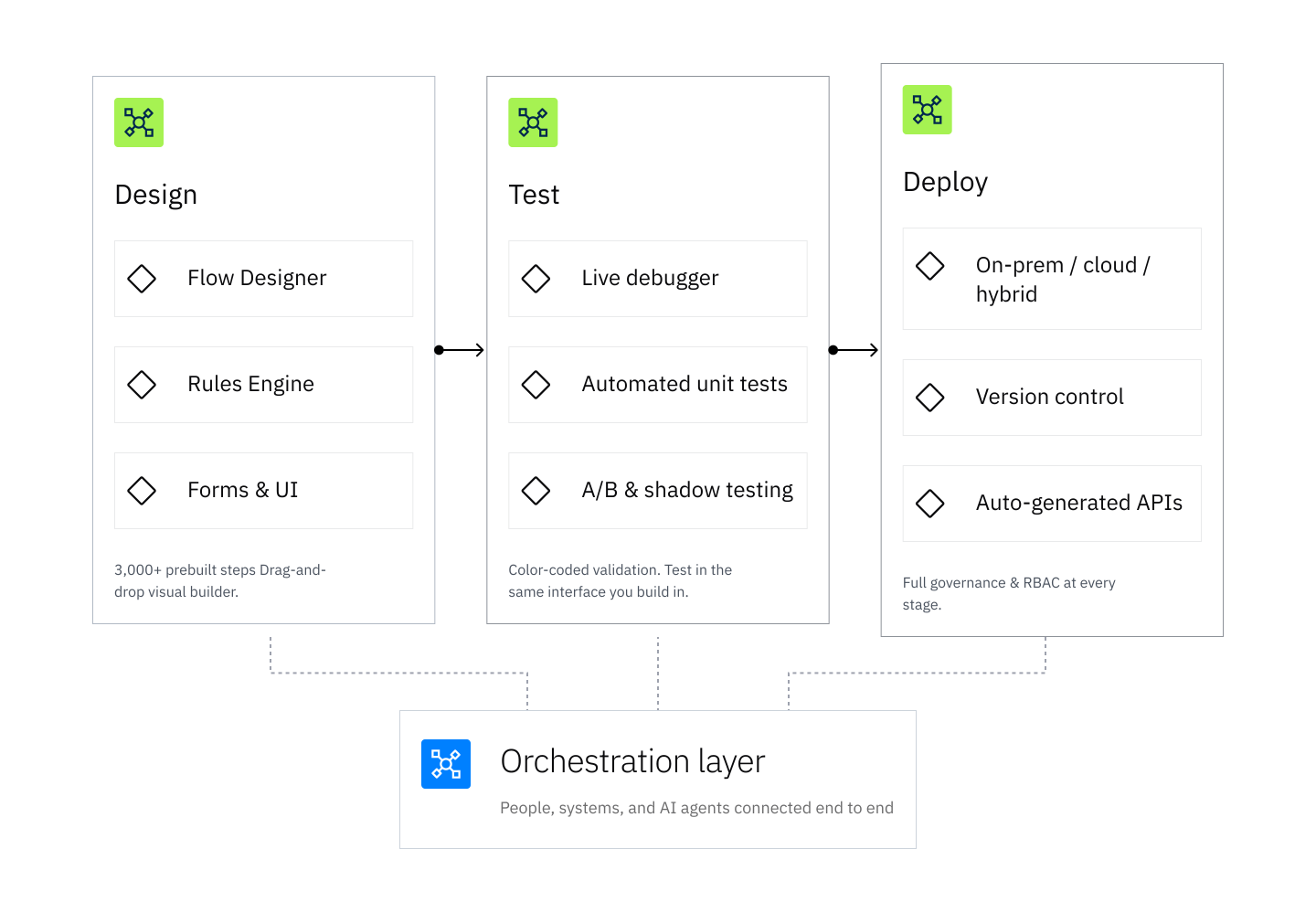
    Design Test Deploy Diagram

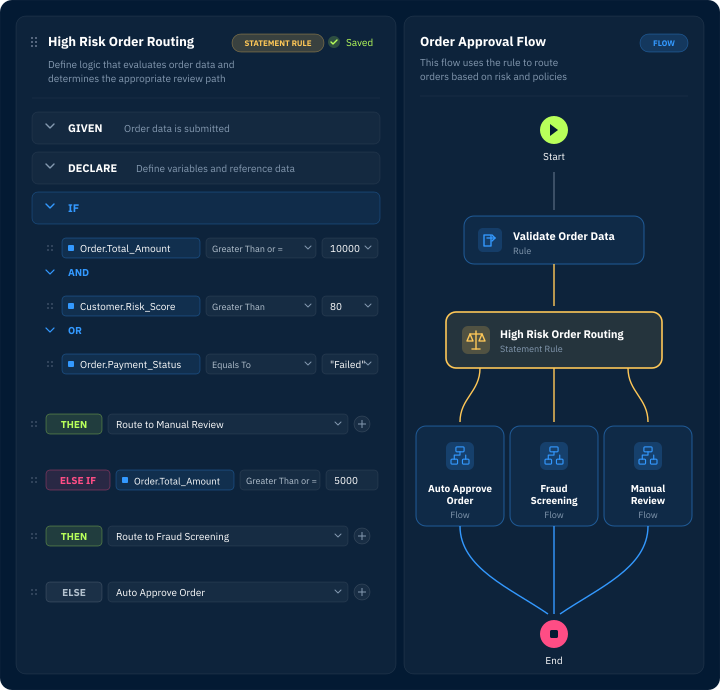
    Design workflows visually.
    Ship logic faster.

    Drag, drop, and orchestrate. The Flow Designer turns complex business logic into visual workflows anyone can read, maintain, and extend.

    Visual Flow Designer (composed illustration placeholder)
    Rules-First Logic (composed illustration placeholder)
    Agent-Ready Design (composed illustration placeholder)
    Connect / integrations
    Visual Flow DesignerBuild end-to-end processes with drag-and-drop steps—branching, looping, parallel execution, and more. Thousands of prebuilt actions ready to use.
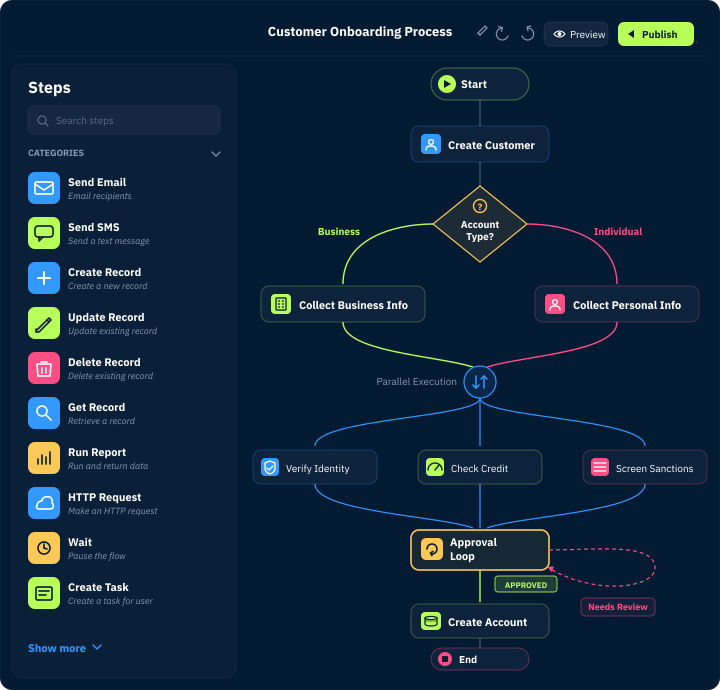
    Build end-to-end processes with drag-and-drop steps—branching, looping, parallel execution, and more. Thousands of prebuilt actions ready to use.

    Visual Flow Designer (composed illustration placeholder)
    Turn Integrations into Workflows
    Rules-First LogicDefine policies, validations, routing, and decisions as reusable rules instead of burying business logic in code.
    Connection Text Lines
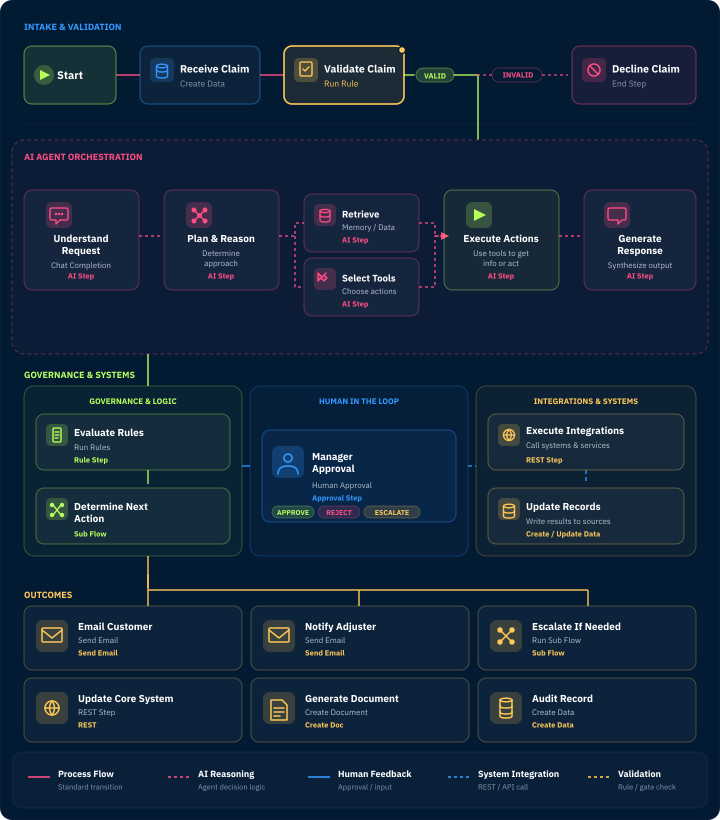
    Agent-Ready DesignDesign AI agents and tool flows that connect agent actions to approved workflows, rules, systems, and business outcomes.

    Build the right way from the start.

    Use Decisions best practices to keep automation readable, reusable, documented, tested, and ready to move from development to production.
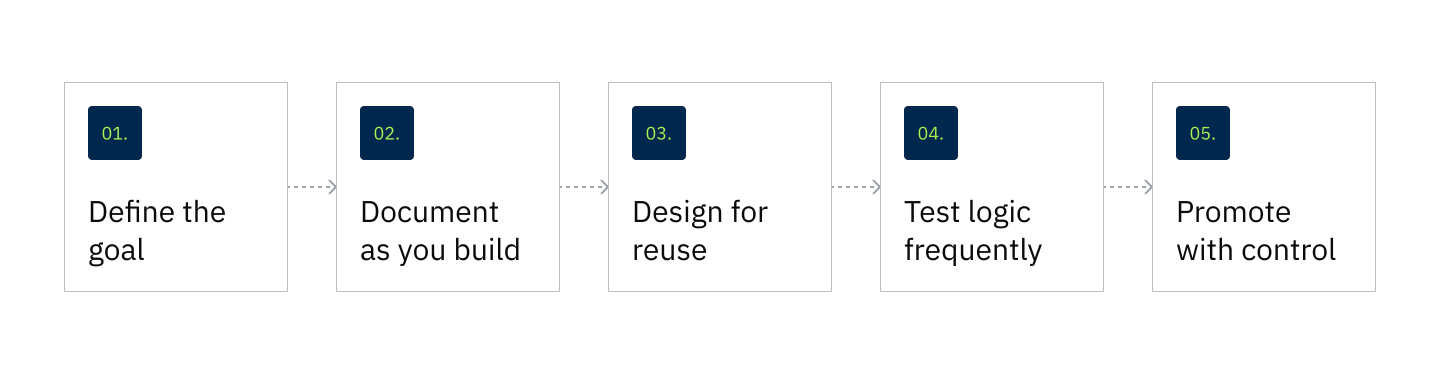
    Build Flow Diagram
    View Our Best Practices

    Test before you ship.
    Fix before it breaks.

    Validate rules, debug flows, and simulate outcomes—directly in the same visual designer you built them in. No exports. No separate environments. No surprises in production.

    Debug as You Build (composed illustration placeholder)
    Unit Tests & Sample Data (composed illustration placeholder)
    A/B and Champion/Challenger Testing (composed illustration placeholder)
    Magnified Text
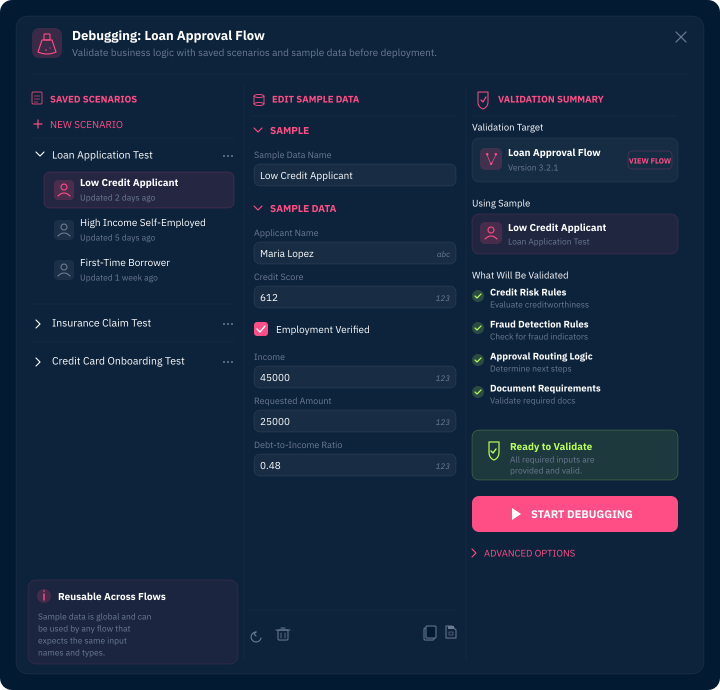
    Debug as You BuildUse the Flow Debugger and sample data to test process logic during design and catch issues earlier.
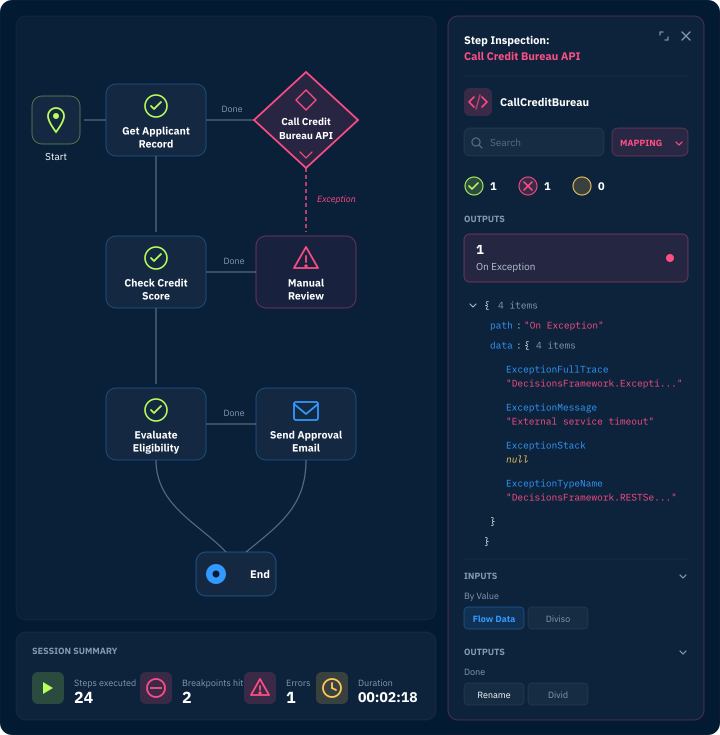
    Use the Flow Debugger and sample data to test process logic during design and catch issues earlier.

    Debug as You Build (composed illustration placeholder)
    Deterministic Decision Layer
    Unit Tests & Sample DataCreate saved test configurations for rules and workflows. Run them during development or on demand with sample data to validate logic before it goes live.
    Diverging Vertical Arrows
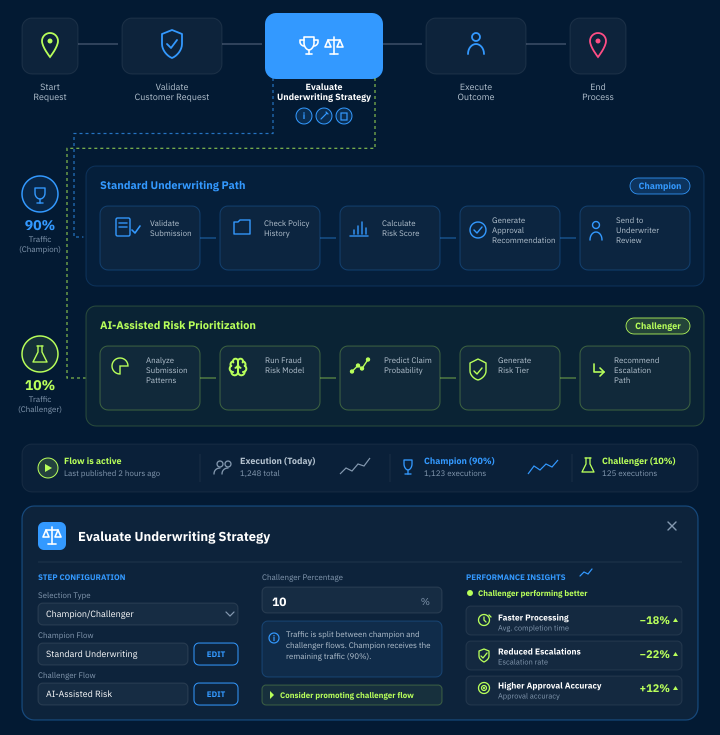
    A/B and Champion/Challenger TestingCompare alternate rules, flows, and decision paths using champion/challenger logic before promoting the best-performing version.

    Deploy anywhere.
    Govern everything.

    Move projects from development to testing to production with the control teams need for enterprise orchestration.

    Logic lives outside of code

    Your rules


    Run Decisions on-premise, in containers, or in the cloud. Same platform, same capabilities—fully portable across environments.

    Rules at the core

    Version control & governance

    Track every change with full version history. Manage the lifecycle from dev to staging to production with role-based permissions and audit trails.
    Orchestration background (composed placeholder)

    Orchestrate it all.

    Every workflow you design, every rule you test, and every deployment you push is orchestrated end to end. Decisions coordinates people, systems, and data across your entire operation—with full visibility and control at every step. Connect to external systems through REST APIs and prebuilt modules, trigger multi-step processes across departments, and keep humans in the loop exactly where they need to be. This isn’t just automation. It’s orchestration.

    Trusted by organizations solving dynamic problems.

    “I'm able to build enterprise grade applications without writing a single line of code. The designers are easy to use, and I've been able to get the performance and speed that I desire for my applications.”

    Chris M
    Decisions customer Chris M

    Teams choose Decisions to build fast and deploy with confidence.

    Diamond

    One Platform, Zero Handoffs

    Design, test, and deploy without switching tools or environments.

    Circle Square Connection Line

    Built for Both Sides

    Business users design rules. Developers extend and integrate. Everyone works in the same environment.

    Dot List

    Governance by Default

    Role-based access, version control, and full audit trails—baked into every stage of the lifecycle

    Questions?
    We’ve got answers.

    What does design, test, and deploy mean in Decisions?+−

    It means teams can build workflows, rules, forms, integrations, and AI-enabled processes; validate them before launch; and deploy them through governed project and repository practices.

    Can business users participate in the design process?+−

    Yes. Decisions uses a low-code, drag-and-drop designer so business users can model rules, forms, and workflows visually, while developers extend and integrate them in the same environment.

    How does Decisions support testing?+−
    Decisions logomark

    Make your dev lifecycle better all the way around.

    See how Decisions brings design, test, and deploy into one orchestrated platform. Talk to our team today.

    Continuous

    Auto-generated APIs

    Every workflow is instantly accessible via REST or SOAP. Auto-generate services from flows and rules—call and manage them from any external system.

    Boxed circles

    Thousands of Steps. Infinite Possibilities.

    Prebuilt actions for every scenario. Custom .NET SDK for anything else.

    Opposite Arrows

    Scale Without Compromise

    Thousands of steps per second in production. Clustered environments. Built for enterprise-scale workloads.

    Vertical Arrow Text

    Deploy Your Way

    On-prem, containerized, or cloud—same platform, full flexibility, no lock-in.

    Decisions includes a live flow debugger, saved unit tests with sample data, and A/B and champion/challenger testing—all in the same visual designer you build in, so you can validate logic before it goes live.

    Can Decisions support enterprise DevOps practices?+−

    Yes. Decisions supports controlled promotion across projects, branches, revisions, and environments with full version control, role-based access, and audit trails for enterprise DevOps workflows.

    How does orchestration fit into design, test, and deploy?+−

    Orchestration connects every stage end to end—coordinating people, systems, data, and AI agents across the lifecycle so designed workflows, tested rules, and deployed processes run together with full visibility and control.